
Bluetooth NFC Readers for Android & iOS
Compare ACR1555U and ACR1255U-J1 for a mobile card workflow, then evaluate the reader, host and application together.
Application guides
Bluetooth links an external reader to the host; NFC links that reader to the card or tag. These are separate connections. For a mobile project, define the card operation and decide whether your application needs card commands through a BLE library or only supported keyboard output. Pairing a reader does not complete the application integration.
Discuss this applicationCompare candidate models
Use these models as a starting point. Confirm the exact variant, software support and evaluation results for your project before ordering.
| Model | Selection focus | Confirm for your project |
|---|---|---|
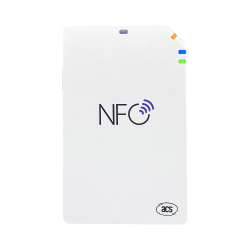 ACR1555U Specifications & downloads ACR1555U Specifications & downloads | ACR1555U lists Bluetooth 5.2, USB Type-C, ISO 14443 and ISO 15693, plus Bluetooth HID keyboard emulation. | Confirm the required mode and UID output format. For read/write or APDU operations, check the model-specific BLE library and evaluate the actual card workflow; HID is a different route. |
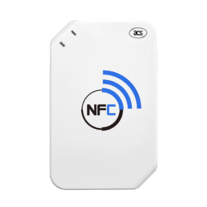 ACR1255U-J1 Specifications & downloads ACR1255U-J1 Specifications & downloads | ACR1255U-J1 lists BLE 4.0, USB Mini-B and reader/writer support for ISO 14443 cards and ISO 18092 NFC. | Confirm the existing BLE application and card commands. Do not transfer ACR1555U keyboard mode or ISO 15693 support to this model, or assume an existing application can switch readers unchanged. |
Plan the evaluation
Define both connections
Record the reader-to-card operation and reader-to-host interface separately. Use the intended card and a known expected response, rather than pairing alone as the acceptance test.
Check the software route
The manufacturer provides Android and iOS BLE evaluation resources for both models. Check the chosen package, supported OS versions, APIs and licence. A USB PC/SC driver is not the BLE integration route for a mobile app.
Test the mobile workflow
Evaluate discovery, permissions, reconnecting after interruption, card presentation and error handling on the intended device. Include app background behavior and charging in your own evaluation; do not infer an all-day battery runtime from a rechargeable battery.
What to include in your enquiry
- Phone/tablet model, Android or iOS version and application environment
- Exact card/tag, identifier or data required, commands and access requirements
- Preferred reader, BLE/USB route, keyboard mode or BLE library, and current SDK version
- Evaluation and order quantities, delivery country and project schedule
The Contact form will include this guide as its source. Add your requirements, review the details and submit your enquiry online.
Price, evaluation-unit availability, quantities, software scope and delivery need confirmation for each request.
Before you order
Does Bluetooth HID replace a BLE card-reading SDK?
HID keyboard output and a BLE library serve different application needs. A keyboard-style identifier does not provide arbitrary APDU exchange or access to protected card data. Check the ACR1555U mode and output configuration before selecting it for an existing application.
Will any Android or iOS app work after pairing?
The app must support the selected reader and integration route. Check its library, API, permissions and OS/device requirements. A manufacturer evaluation app is a starting point for testing, not evidence that every third-party app is compatible.
Can I replace ACR1255U-J1 with ACR1555U without changing software?
Compare interfaces, card commands, library/API use and mode configuration, then run the same tests on the new setup. A common manufacturer and NFC capability do not establish an interchangeable software interface.
Does this turn a phone into a long-range RFID or payment reader?
These candidates are external NFC readers. Bluetooth carries data to the host and does not extend the NFC card-reading range. Define the exact card application; NFC support alone does not provide a payment solution or guarantee access to a mobile wallet.
Manufacturer references
Technical details refer to the original ACS model documentation. Use the linked product pages for the full specifications and downloads.
Application guides
Explore another application
USB NFC readers
Choose a desktop reader by card technology, required operation and host software, rather than by USB connector alone.
Read selection guideUSB-C card readers
Match contact, contactless or dual-interface reading to the card workflow before choosing a USB-C configuration.
Read selection guideFIDO2 security keys
Match the login service, host connection and verification policy before choosing a hardware security key.
Read selection guideContact smart card readers
Match an ISO 7816 card with the reader interface, host platform and middleware your application actually uses.
Read selection guideOEM NFC modules
Choose an embedded reader around the host connection, board space and antenna position, then evaluate it inside the intended enclosure.
Read selection guideePassport & ID readers
Separate optical capture, chip communication and QR scanning requirements before choosing a document reader configuration.
Read selection guide