
FIDO2 Security Key Selection for Enterprise Deployment
Match the login service, host connection and verification policy before choosing a hardware security key.
Application guides
A FIDO2 security key is an authenticator for a supported login service. It is different from a general-purpose NFC reader. Start with the service's enrollment policy and your users' devices, then compare the connection and verification method. A key's connector or a manufacturer's platform list does not establish compatibility with every account or workplace login.
Discuss this applicationCompare candidate models
Use these models as a starting point. Confirm the exact variant, software support and evaluation results for your project before ordering.
| Model | Selection focus | Confirm for your project |
|---|---|---|
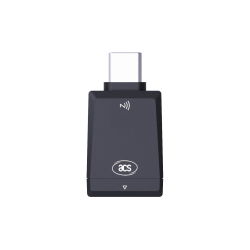 PocketKey+ Bio Specifications & downloads PocketKey+ Bio Specifications & downloads | PocketKey+ Bio lists USB-C and NFC connectivity, with a fingerprint sensor for USB use. | Fingerprint verification is available via USB only, not NFC. Evaluate the service's verification policy and the intended connection separately. |
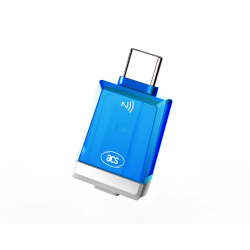 PocketKey+ II Specifications & downloads PocketKey+ II Specifications & downloads | PocketKey+ II lists USB-C, NFC and a mechanical switch for presence confirmation, plus separate PKI features. | A touch confirms presence; it does not identify a fingerprint. Check the required PIN or verification workflow. Evaluate PKI separately from FIDO login. |
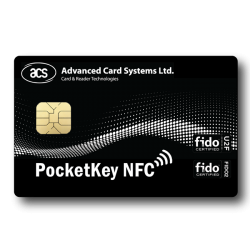 PocketKey NFC Card Specifications & downloads PocketKey NFC Card Specifications & downloads | PocketKey NFC Card is a card-shaped FIDO authenticator with an NFC interface, rather than an NFC reader. | Confirm the phone or reader, OS, browser and service support the required FIDO transport. An arbitrary NFC or PC/SC reader does not establish WebAuthn compatibility. |
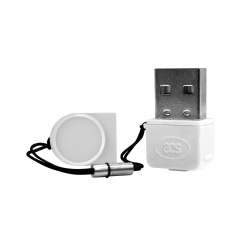 PocketKey Specifications & downloads PocketKey Specifications & downloads | PocketKey lists a USB-A connector, USB HID and a mechanical switch for presence confirmation. | Evaluate the actual USB host and service. Do not transfer the other candidates' NFC or fingerprint features to this model. |
Plan the evaluation
Map services and policies
List the accounts, managed-device restrictions, USB/NFC paths and requirements for user verification or attestation. Confirm with the service administrator which exact key configurations may be enrolled.
Pilot the complete login
Test registration, normal sign-in and error handling on the intended devices with approved test accounts. Check USB and NFC separately. If fingerprint verification is required, evaluate PocketKey+ Bio through USB; NFC does not provide its fingerprint function.
Plan recovery and rollout
Enroll a second key separately where the service allows it, and test the approved recovery process. A spare unregistered key does not restore an account. Define lost-key revocation, staff departure and replacement procedures before choosing quantities.
What to include in your enquiry
- Login services, enrollment policies and required verification or attestation
- Host devices, OS/browser versions and USB-A, USB-C or NFC connection
- Preferred models, fingerprint requirements, pilot users and separately enrolled backup keys
- Evaluation and rollout quantities, delivery country and project schedule
The Contact form will include this guide as its source. Add your requirements, review the details and submit your enquiry online.
Price, evaluation-unit availability, quantities, software scope and delivery need confirmation for each request.
Before you order
Does PocketKey+ Bio verify a fingerprint over NFC?
The manufacturer specification limits its fingerprint function to USB. The key also lists NFC connectivity, but that does not add fingerprint verification to NFC sign-in. Test the service's requirements for each connection.
Does touching a key mean fingerprint verification?
User presence and user verification are different requirements. A mechanical touch can confirm presence; PIN or biometric verification is a separate capability and policy choice. Check the exact model, interface and service configuration.
Will a FIDO2 key work with every login or NFC reader?
The service must support and allow the intended authenticator, and the browser, OS and connection must provide the required FIDO route. A radio standard, connector, driver or vendor platform list alone does not establish compatibility with every workflow.
Can a spare key copy my existing login credentials?
Device-bound FIDO credentials are not a transferable backup file. Register an additional key separately with each supported service and plan recovery under its policy. Possessing an unregistered replacement key does not recover the account.
Model specifications & deployment references
Use the ACS pages for model specifications and downloads. The FIDO Alliance references explain deployment, verification and recovery considerations; they do not certify Elvantic or guarantee a particular service's compatibility.
Application guides
Explore another application
USB NFC readers
Choose a desktop reader by card technology, required operation and host software, rather than by USB connector alone.
Read selection guideUSB-C card readers
Match contact, contactless or dual-interface reading to the card workflow before choosing a USB-C configuration.
Read selection guideBluetooth NFC readers
Compare ACR1555U and ACR1255U-J1 for a mobile card workflow, then evaluate the reader, host and application together.
Read selection guideContact smart card readers
Match an ISO 7816 card with the reader interface, host platform and middleware your application actually uses.
Read selection guideOEM NFC modules
Choose an embedded reader around the host connection, board space and antenna position, then evaluate it inside the intended enclosure.
Read selection guideePassport & ID readers
Separate optical capture, chip communication and QR scanning requirements before choosing a document reader configuration.
Read selection guide