
USB NFC Reader Selection Guide
Choose a desktop reader by card technology, required operation and host software, rather than by USB connector alone.
Application guides
A desktop NFC project starts with a specific card or tag and a defined operation: reading an identifier, exchanging card commands or writing supported tag data. USB connectivity alone does not establish compatibility with the card application. Use the required card standard and operating mode to narrow the hardware, then test it with the intended host and software.
Discuss this applicationCompare candidate models
Use these models as a starting point. Confirm the exact variant, software support and evaluation results for your project before ordering.
| Model | Selection focus | Confirm for your project |
|---|---|---|
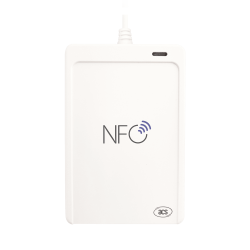 ACR1552U Specifications & downloads ACR1552U Specifications & downloads | ACR1552U supports reader/writer, card emulation and keyboard emulation. Its listed card standards include ISO 15693. | Choose the connector variant and required operating mode; check the card commands and SAM requirements in the model documentation. |
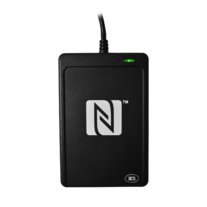 ACR1252U Specifications & downloads ACR1252U Specifications & downloads | ACR1252U lists reader/writer, card emulation and peer-to-peer NFC modes, with a SAM slot. | Check the exact card standard and mode. Do not assume its supported modes or card families are identical to ACR1552U. |
Plan the evaluation
Define a repeatable test
Use the intended card or tag and record the read/write operations, expected response and host environment.
Check the software route
Review the driver, reference manual and applicable SDK. Confirm what is included and whether separate software or licences are needed.
Evaluate the complete setup
Test card presentation, operating mode and recovery after disconnecting the reader before choosing a deployment quantity.
What to include in your enquiry
- Card or tag model and required operations
- Host operating system, application and USB connector
- Operating mode and SAM requirements
- Evaluation quantity, delivery country and project schedule
The enquiry page will include this guide as its source. Add your requirements before reviewing and sending the WhatsApp draft.
Price, evaluation-unit availability, quantities, software scope and delivery need confirmation for each request.
Before you order
Can one NFC reader work with every NFC card?
Start with the standards listed for the reader, then confirm the exact card application and commands. A supported radio standard does not by itself provide the application's keys, data format or business software.
Is keyboard emulation the same as PC/SC access?
They are different integration routes. Define whether the application expects keyboard input or needs to exchange card commands, and check the model's supported mode and configuration instructions.
Will a driver or SDK complete my application?
Drivers and development resources help connect and evaluate the hardware. Confirm the software scope, licence and work needed to implement your own card workflow.
Application guides
Explore another application
Contact smart card readers
Match an ISO 7816 card with the reader interface, host platform and middleware your application actually uses.
Read selection guideOEM NFC modules
Choose an embedded reader around the host connection, board space and antenna position, then evaluate it inside the intended enclosure.
Read selection guideePassport & ID readers
Separate optical capture, chip communication and QR scanning requirements before choosing a document reader configuration.
Read selection guide